 BudgetLuma
Track spending together. See who paid what.
BudgetLuma turns shared expenses into one calm shared wallet — for couples, roommates, trips and projects. Everyone adds spending in their own currency, the contribution balance stays fair, and your real bank rate is always preserved.
- Shared wallets (your spaces) with roles, invitations and a fair contribution balance
- Multi-currency spending kept at the exact rate your bank charged
- Public share links that show safe summaries — never private transactions
What you paid is what stays — even if exchange rates change later.
Free to start. No credit card. · Available on iOS
Invited to a shared wallet? Join free.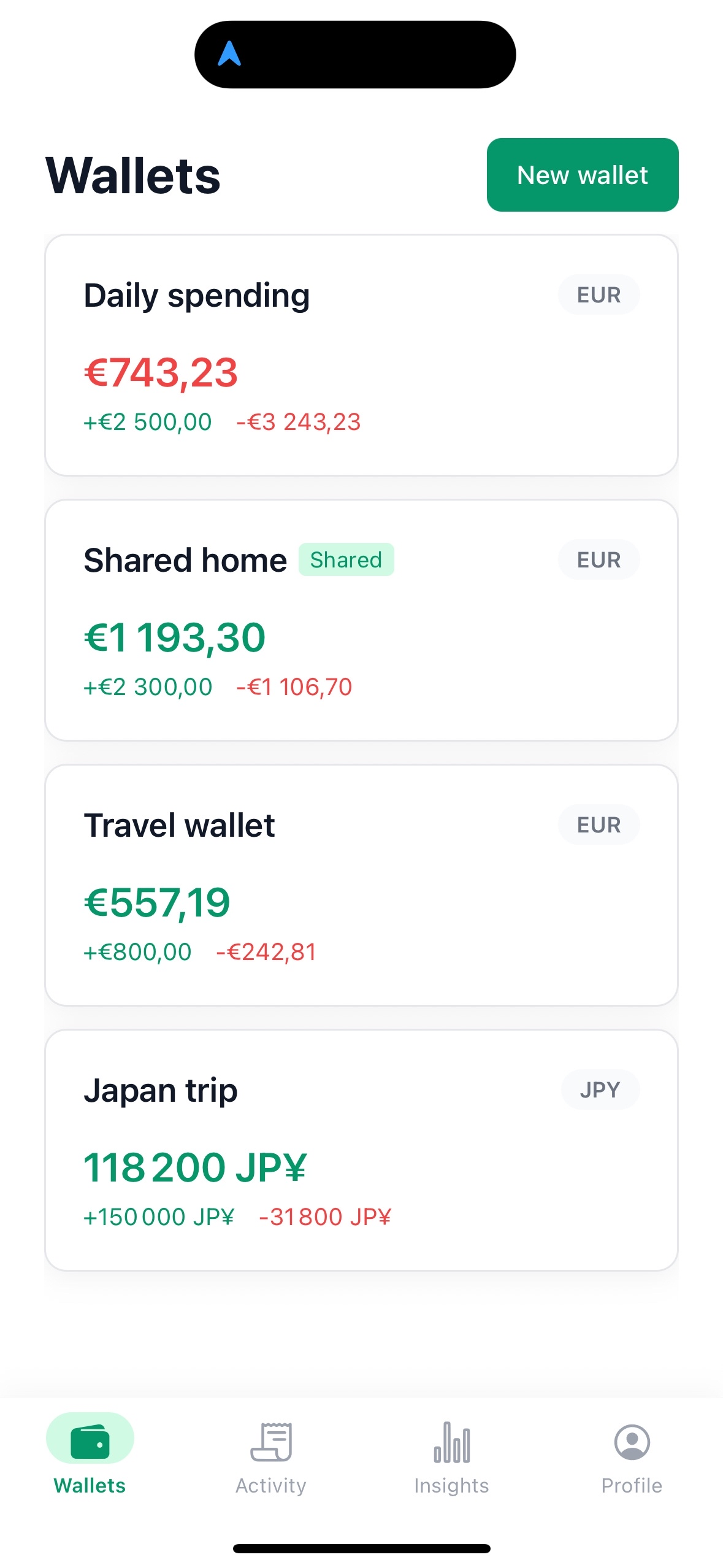
Everything shared money needs. Nothing it doesn't.
Everything below is live in the product today — backed by server-side rules, not UI promises.
Wallets as shared spaces
Create a wallet — your “space” in the app — for each context: a couple’s budget, a flat-share, a trip, a project. Each space has its own base currency, its own members and its own transactions. No folders, no tags, no one giant list.
Shared, with real roles
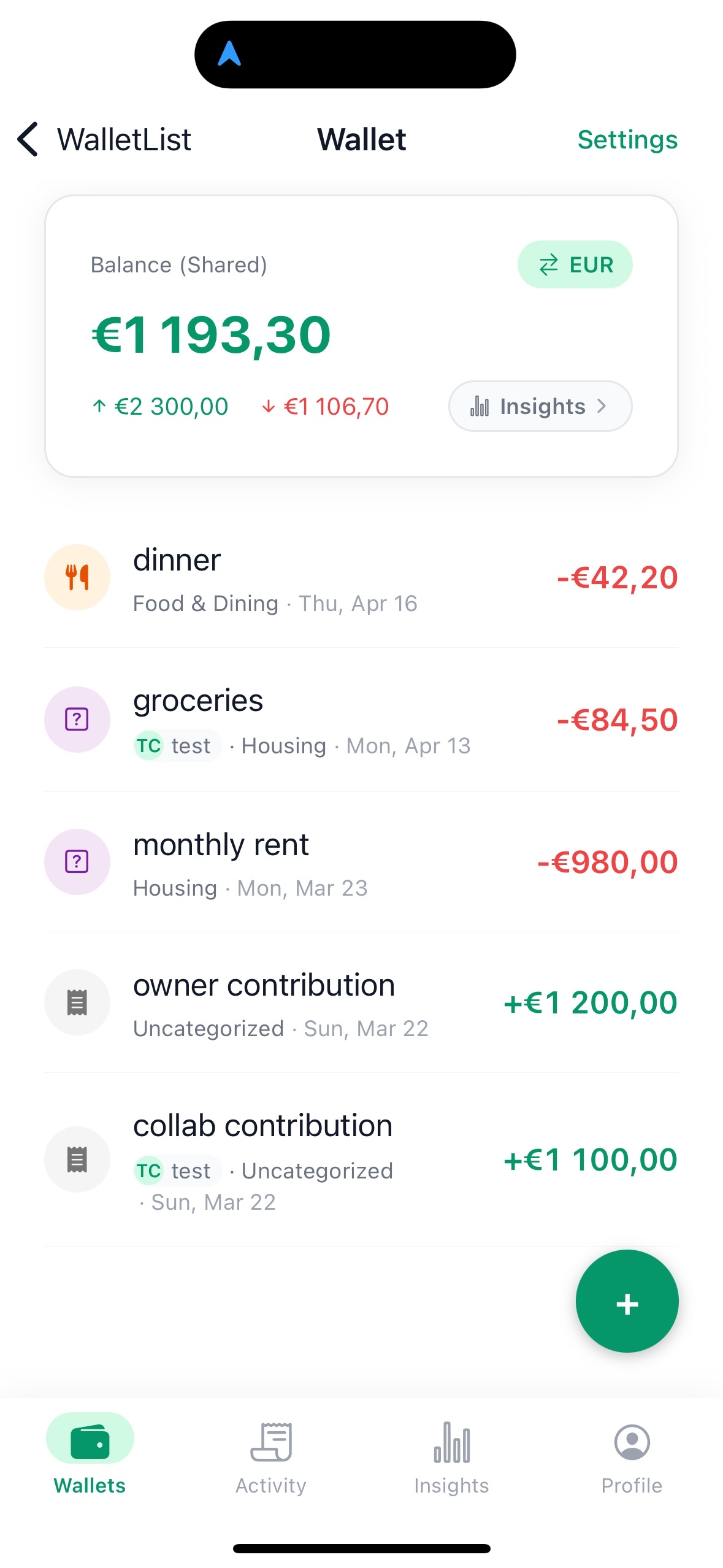
Invite a partner, roommate or small group by email. Assign owner, editor or viewer. Everyone adds spending, and the contribution balance shows who paid what. Every permission is enforced server-side — the backend decides, not the app.
Multi-currency, preserved not rewritten
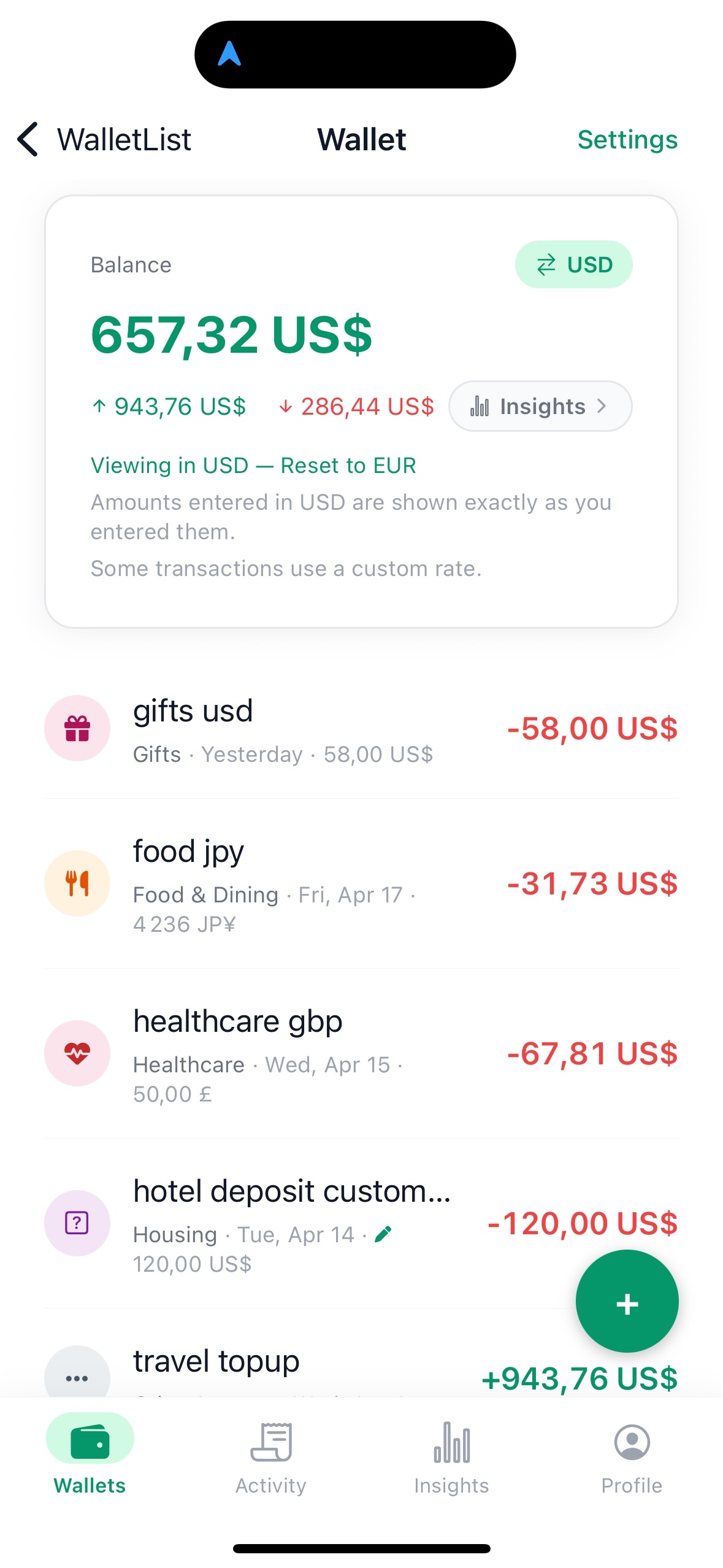
50 currencies, reference rates refreshed hourly. Every transaction stores the original amount and currency — nothing is silently converted. Premium adds custom rates to match your real bank statement.
Insights, without gimmicks
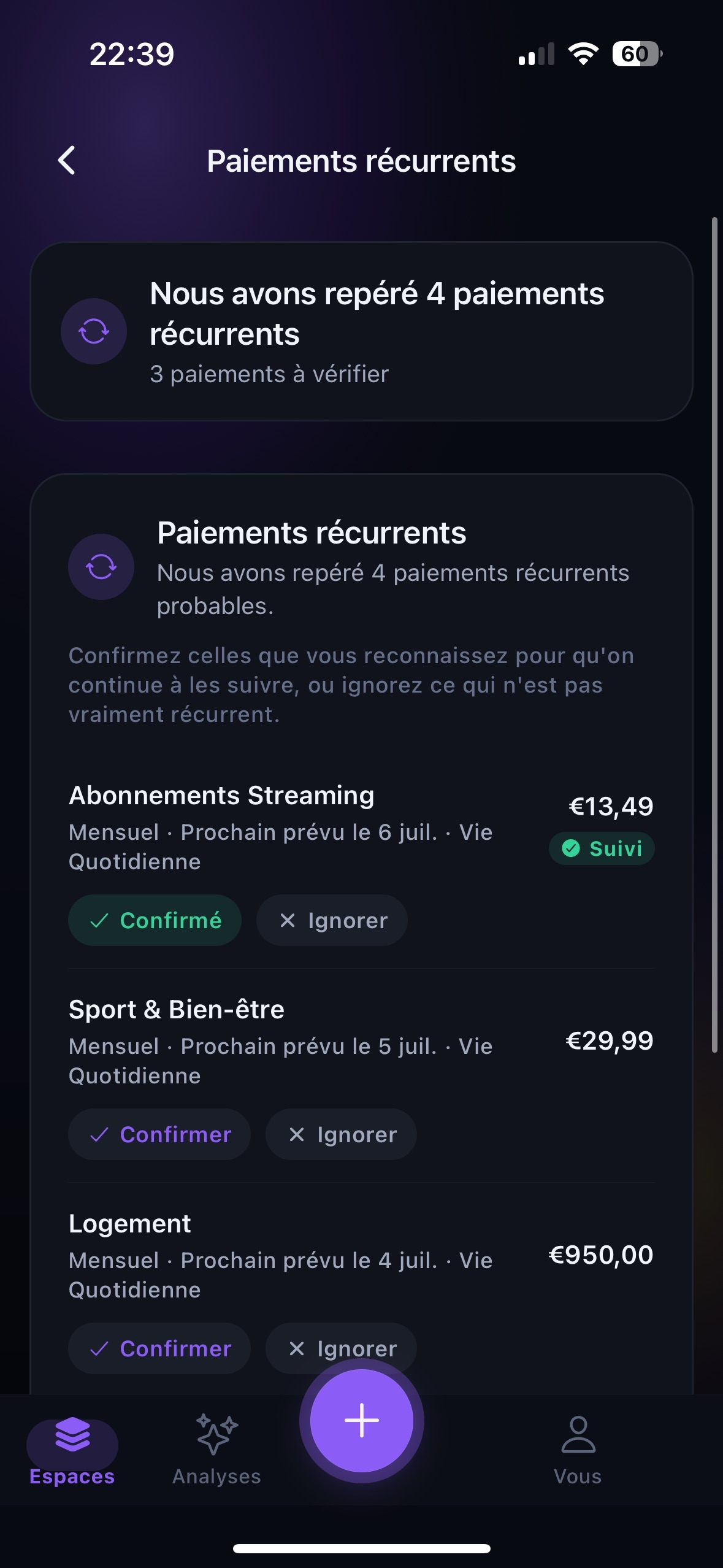
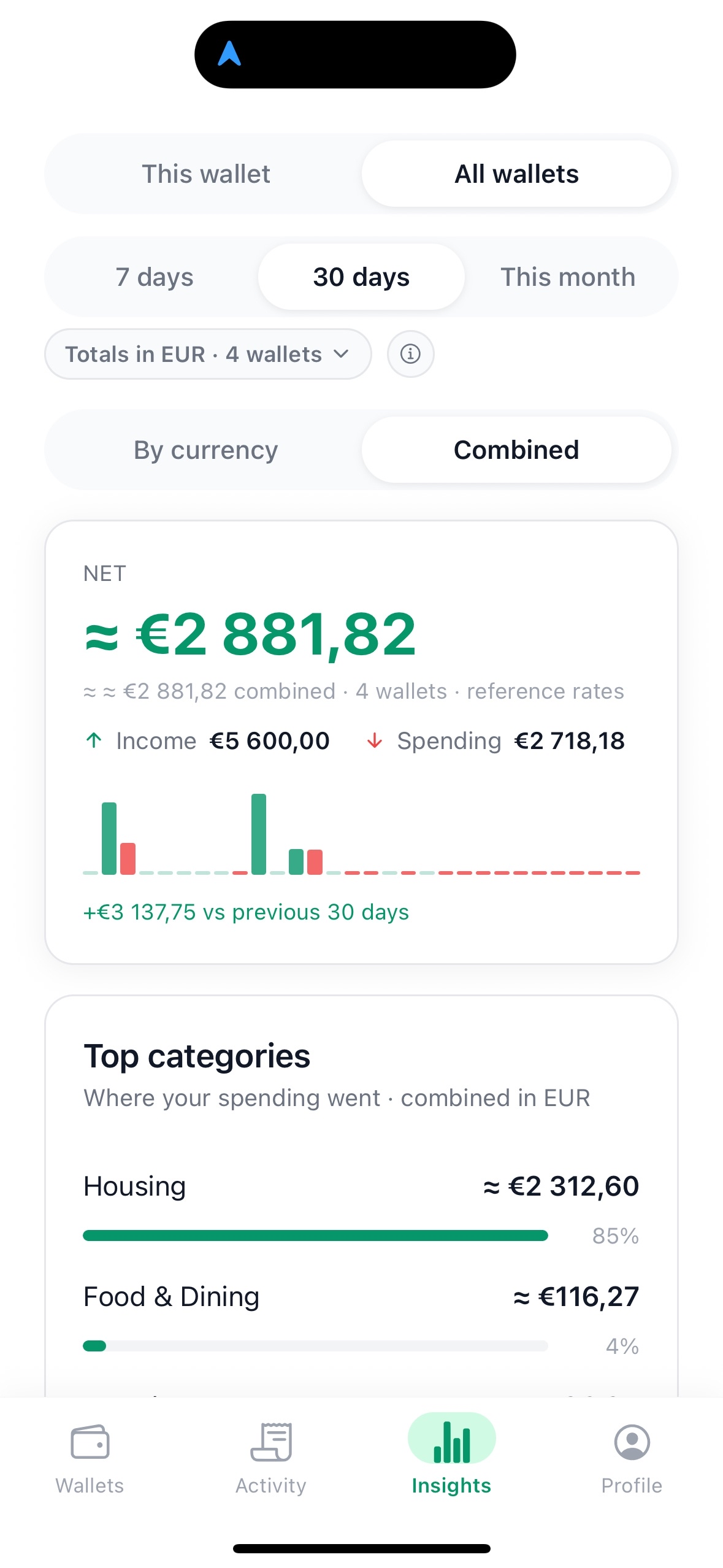
Totals, top categories and a calendar heatmap on the free tier. Premium adds recurring-payment detection, a monthly run-rate forecast, and a contribution balance for shared wallets.
Server-authoritative by design
Balances, FX conversions and permissions are computed on the backend, behind row-level security. No bank sync. No ads. No tracking. No sale of data. Delete your account any time.
Shared money, tracked together — and fairly.
BudgetLuma treats a shared wallet as a first-class space — not a folder, a tag or a spreadsheet. Everyone adds spending in their own currency, and the contribution balance shows who paid what, with no judgement. Your first shared wallet is free to create, and members always join free; Premium unlocks unlimited wallets.
Good to know · If the owner’s Premium ends, existing shared wallets and their members keep full access. Only creating wallets beyond the free limit pauses until they upgrade again.
Invite by email, assign a role
Owner, editor or viewer. Owners manage members and invitations. Editors add and edit transactions. Viewers see everything, change nothing. Roles are enforced on the server.
Free to join, always
You don’t need a premium subscription to be invited into someone else’s shared wallet. Add transactions, view balances, contribute — fully free as a member.
Real-time notifications
Invitations trigger email, push and in-app inbox notifications. Deliveries are idempotent and retried automatically. Each inbox item has a clear lifecycle: unread, read, archived.
Contribution balance — who paid what
See each member’s contribution and the fair equal-share per person, so settling up is obvious. Free for the current month; Premium adds the full history. Numbers only — no “top spender” labels, no judgement.
Your real bank rate. Preserved. Never overwritten.
Most apps silently replace the rate your bank actually charged with a generic reference rate. BudgetLuma stores yours, protects it with database-level triggers, and reuses it on every edit — until you explicitly change it.
50 currencies, refreshed hourly
Reference rates sourced from Frankfurter and ExchangeRate-API and refreshed every hour. Conversions are computed server-side and stored with the transaction.
Original amount never lost
Every transaction keeps both the amount you entered and the converted value in the wallet’s base currency, with the rate used, its source, the provider, and the timestamp. Nothing is inferred.
Custom exchange rate (Premium)
Enter the real rate your bank or card applied, and BudgetLuma stores it as the rate for that transaction. Editing the amount later doesn’t silently overwrite it — you stay in control.
Display override (Premium)
View a wallet or the Insights screen in a different currency without mutating any stored value. The underlying truth stays intact; the lens changes.
On cross-wallet views · Cross-wallet views always label the rates used — explicit “≈” signals and “reference rates” mentions, so you can always reconcile with a bank statement.
Budgets built on real transactions, not intentions.
Pick a wallet or a category, set an amount, choose a window. Progress comes straight from the transactions you (and your wallet’s members) actually recorded — no manual sync, no estimation, no drift.
Honest by default · No envelopes. No multi-year forecasting. No AI predictions. Just budgets against the numbers that actually happened — across multiple wallets and shared wallets alike.
Scope a wallet, or a single category
A budget is attached to one wallet — personal or shared — and can optionally target a single category inside it (e.g., “Groceries” inside the household wallet). Everything else is ignored.
Monthly, or any custom rolling window
Choose a calendar month anchored to any day, or a custom length in days (for example every 14 or 28 days). The period rolls forward automatically.
Progress from real activity, never estimated
The amount spent is the exact sum of the transactions inside the period, in the budget’s currency — using the same stored rates your wallet already trusts. What you see always matches the wallet.
Budget alerts — fixed on Free, custom on Premium
Every plan gets automatic budget alerts at 80% and 100% usage, triggered as you spend, with no setup required. Premium unlocks custom thresholds: define 1 to 5 values between 1% and 100%, per budget. Alerts trigger when spending crosses each value. No daily nudges, no growth theatre.
Budget alerts — Free vs Premium
Same budgets, same real-transaction progress. The difference is in how you’re notified.
Automatic 80% & 100%
- Every budget comes with two alerts built in
- Triggered at 80% and 100% of budget usage
- Zero configuration — always on
Custom thresholds, 1–5 per budget
- Define 1 to 5 custom thresholds, per budget
- Any value between 1% and 100% — e.g. 50 / 75 / 90
- Alerts trigger the moment spending crosses each value
Numbers you can read. No predictions pretending to be AI.
Every insight is a deterministic query over your real transactions — not a model, not a forecast engine, not a black box.
- Per-wallet totals, expenses, income and net
- Top categories with an uncategorized bucket
- Calendar heatmap over 7 days, 30 days, or this month
- Cross-wallet scope (all wallets combined)
- Recurring-payment detection with confidence levels
- Monthly run-rate forecast with strict hide rules
- Shared-wallet contribution balance
- Currency mix and currency shift over time
When there isn’t enough history, the forecast stays hidden. An empty chart is better than a misleading one.
However you share money, there’s a space for it.
One shared wallet per situation that deserves its own story.
Couples
A shared wallet for rent, groceries and date nights. Both partners add spending in any currency, and the contribution balance keeps things fair — no monthly spreadsheet, no awkward maths.
Roommates & flat-shares
Track the shared apartment together: rent, bills, the weekly shop. Everyone’s an editor, the running total is always live, and a public link shows the month at a glance.
Travel groups
One wallet per trip, in the local currency you think in. Reference rates apply automatically — enter your card’s real rate (Premium) so the numbers match your statement, then share the trip total with the whole crew.
Shared households
A calm home for the family pot — groceries, kids, utilities, the holiday fund. Budgets are built on real transactions, and everyone with access sees the same honest numbers.
Projects & events
A wedding, a group gift, a side project, a club. Spin up a dedicated wallet, invite the people involved, set a budget, and see exactly who contributed what.
Start free. Upgrade for more wallets, shared money, and premium insights.
Start free with one personal and one shared wallet, unlimited transactions and the core budget tracking every personal-finance app should have. Premium unlocks the features that make BudgetLuma a complete collaboration, multi-currency and money management app.
Free
Free forever — 1 wallet, unlimited transactions, everything to start organizing a few financial contexts.
- 1 personal wallet + 1 shared wallet you own
- Unlimited transactions, categories and notes
- 50 currencies with hourly reference rates
- 1 budget with automatic alerts at 80% and 100%
- Free tier Insights (totals, top categories, heatmap)
- Join unlimited shared wallets you’re invited to
- English, French and Spanish
Premium
Upgrade when you need more — unlimited wallets, shared money, custom rates, and premium insights.
- Unlimited wallets
- Unlimited budgets, including shared and custom periods
- Custom exchange rates (your real bank rate)
- Display currency override for wallets and Insights
- Custom budget alerts (1 to 5 thresholds between 1% and 100%)
- Premium Insights (forecast, recurring detection, contribution history)
- Custom categories with names and icons
- Wallet-to-wallet transfers between your spaces
- Custom wallet themes
Subscription managed by the App Store. Restore purchases any time. If premium ends, existing shared wallets and members keep full access.
Quiet by design. Yours by default.
No bank connection. No tracking. No ads. Principles we hold in code, not just in copy.
No bank sync
No PSD2, no Plaid, no account scraping. You enter what matters to you — nothing more is collected.
No ads, no tracking
No advertising identifiers, no cross-app tracking, no data sold to third parties. Ever.
Server-authoritative
Balances, permissions, premium status and FX conversions are all computed on the backend, behind row-level security.
Delete on request
Email privacy@budgetluma.com to permanently remove your account, wallets and transactions. Irreversible, and that’s the point.
Questions, answered honestly.
Is BudgetLuma available on Android?
Not yet. BudgetLuma is currently available on iOS only, via the App Store.
Which currencies are supported?
50 currencies today: EUR, USD, GBP, JPY, AUD, BRL, CAD, CHF, CNY, CZK, DKK, HKD, HUF, IDR, ILS, INR, ISK, KRW, MXN, MYR, NOK, NZD, PHP, PLN, RON, SEK, SGD, THB, TRY, ZAR, AED, CLP, COP, DZD, EGP, GHS, KES, KWD, MAD, NGN, PEN, PKR, QAR, SAR, TND, TWD, UAH, VND, XAF and XOF. Reference rates are refreshed hourly.
Do I need Premium to join a shared wallet?
No. If someone invites you into their shared wallet, you can join and fully participate for free — add transactions, view balances, and contribute. You can also create your own shared wallet for free; Premium is only needed to go beyond the free plan’s wallet limit.
Can I see who paid what in a shared wallet?
Yes. Every member adds their own spending, and the contribution balance shows what each person has put in alongside the fair equal-share per member — so it’s obvious who’s ahead and who owes. It’s numbers only: no “top spender” labels and no judgement. The current month is available on every plan; longer history is a Premium feature.
Can I share a budget with someone who doesn’t have the app?
Yes, with public share links. Turn any wallet into a read-only link (budgetluma.com/share/…) that opens in any browser — no account or app required. It shows a safe, aggregated summary (totals, top categories, budget progress) and never reveals individual transactions, member emails or notes. You can turn the link off or regenerate it at any time.
Is BudgetLuma good for roommates or splitting bills?
Very. Create one shared wallet for the apartment, invite your flatmates as editors, and everyone logs rent, bills and the weekly shop. The contribution balance shows who paid what and the fair split, so settling up is simple. Note that BudgetLuma tracks and splits the numbers — it doesn’t move money or process payments between people.
What is a custom exchange rate?
When you spend in a different currency, your bank or card applies a specific rate that rarely matches a public reference rate. With Premium, you can enter that exact rate on a transaction. BudgetLuma then uses it as the truth for that transaction and won’t silently overwrite it on later edits.
What happens if my Premium subscription ends?
Existing shared wallets and their members keep full access. You keep all your data. Only creating wallets beyond the free limit and the premium-only views pause until you renew.
Can I export my data to CSV or PDF?
Not yet. CSV and PDF exports are on the backlog but not shipped. You can always request a full account deletion to remove everything.
Is this a budgeting app with envelopes or forecasts?
BudgetLuma now includes budgets. You can set a budget on a wallet (personal or shared), or on a single category inside a wallet, over a calendar month or any custom rolling window. Progress is the exact sum of your real transactions — no envelopes, no multi-year forecasting, no predictive models. Just a simple, honest target measured against what actually happened.
How do budgets work in BudgetLuma?
Choose a wallet (or one category inside it), set an amount and currency, and pick a period — a calendar month anchored to any day, or a custom length in days (for example every 14 or 28 days). Progress is computed from the transactions already recorded in that wallet, in the budget’s currency. Every budget has automatic alerts at 80% and 100% usage; Premium adds custom thresholds (1 to 5 values between 1% and 100%) per budget. The free plan includes one budget; Premium unlocks unlimited budgets, including shared and multi-currency budgets.
What’s included in budget alerts?
Budget alerts are threshold-based. On Free, every budget automatically sends an alert at 80% and at 100% of its amount — no configuration needed. On Premium, you replace the defaults with your own custom thresholds per budget: 1 to 5 values between 1% and 100%. An alert triggers the moment your spending crosses each threshold.
Does BudgetLuma use AI or machine learning?
No. Every insight is a deterministic SQL query over your real transactions. Recurring-payment detection uses exact-amount clustering; the monthly forecast is a simple run-rate. No model, no prediction, no black box.
How do I delete my account?
Email privacy@budgetluma.com. Your account, wallets, transactions and memberships are permanently and irreversibly removed from our systems.
Which languages are available?
English, French and Spanish today, with full parity across every screen and notification.
Give every context its own wallet.
Daily spending, savings, travel, shared money — organized calmly, computed honestly, preserved in your own currencies.
Free to start. No credit card. Available on iOS.